


7 Little Words and More
4.744.36K Reviews
App Specs
- Version
- 8.15.2
- Updated On
- License
- Free
- Downloads
- 1,000,000+
- Developer
- Blue Ox Family Games, Inc.
- Categories
- Word
- Platform
- Android
Screenshots
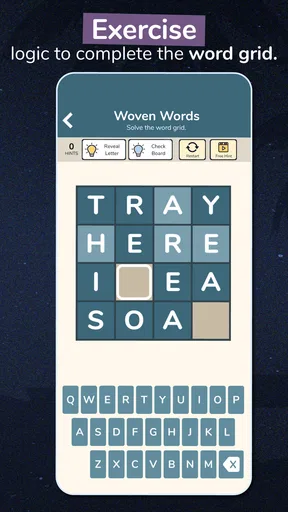
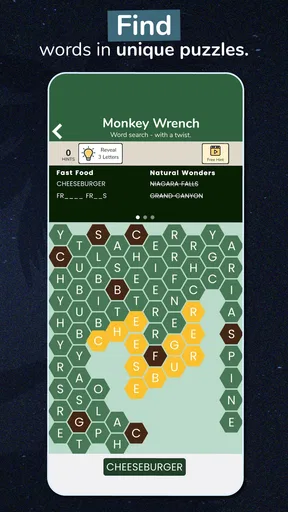
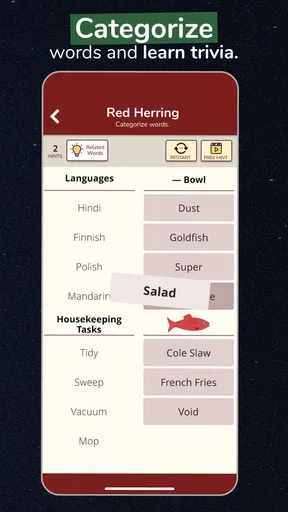
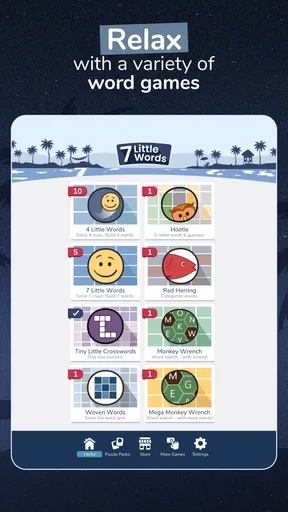
 Analysis by AppCompare
When I want a word game that asks for a little more than spotting familiar words in a grid, 7 Little Words gives me a satisfying change of pace. Its clue-and-letter-tile format makes each answer feel like a small deduction rather than a quick reflex, and that focused rhythm is the game’s strongest point. It suits short breaks especially well, though anyone looking for a competitive, fast-moving game may find its measured pace too quiet.
What Exactly is 7 Little Words and More?
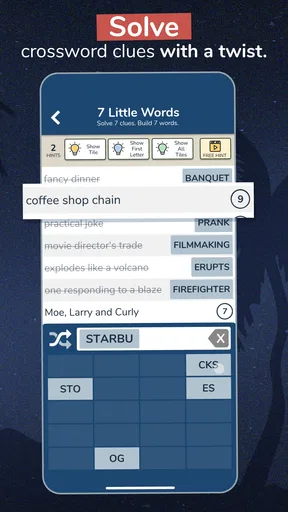
If you're a fan of word games, you might already have an idea of what to expect, but 7 Little Words adds its own unique twist. The app presents you with seven clues and a jumble of letter tiles. Your mission, should you choose to accept it, is to decipher the clues and assemble the letters into the correct words. It's a surprisingly addictive blend that keeps you on your toes.
How the Clues and Tiles Change the Usual Word-Game Rhythm
The format asks you to move between two kinds of thinking: interpreting a clue and testing how its answer can be built from the available letter groups. That makes it different from a standard crossword, where crossing answers can help confirm a guess, and from a word search, where the task is mainly visual scanning. Here, I have to make a meaning-based guess and then check whether the pieces fit.
That distinction is useful if you enjoy vocabulary but do not want to spend a whole session filling a large grid. It also means a clue can feel ambiguous until I look at the tiles with fresh eyes. I try not to lock onto my first interpretation; a quick mental list of synonyms often reveals a more natural match. The game rewards flexible thinking more than speed.
Getting Started is a Breeze
Downloading the app is simple as pie. Just head over to your app store, and in a few taps, you're ready to dive into a world of words. The interface is clean and intuitive, so you won't waste time figuring out how to play. The first few puzzles ease you in with straightforward clues, but don't get too comfortable—things ramp up quickly.
It is a word game from Blue Ox Family Games, Inc., and it is free to start, with optional in-app purchases ranging from $0.99 to $39.99 per item. That makes it easy to try the basic experience before deciding whether any paid extras are worthwhile to you. I would treat purchases as optional conveniences rather than a requirement for enjoying the core puzzle format, and check the purchase details before confirming anything.
The game is rated Everyone, which makes its vocabulary-focused play approachable for a broad audience. Its current version is 8.12.1, and it requires operating system version 10 or later. If you are choosing it for a family device, those practical compatibility details are worth checking before you settle on it as a shared pastime.
Worth Reading Before You Choose

EA SPORTS FC Mobile 26 Is a Bigger Football Game, but It Takes Time

Flipboard Shows What News Apps Must Do Beyond the Feed

Switching to Android Auto Means Rethinking Your Driving Routine

Google Calendar Makes a Crowded Week Easier to Manage

Ludo King Makes the Most of the Minutes Between Plans

Baby Panda World Brings Quick Play to Modern Phones, but Its Game Library Feels Busy
Why You'll Love It
What makes 7 Little Words so engaging is its balance between being challenging and fun. The clues are cleverly crafted, often requiring you to think outside the box. And when you finally crack a particularly tough puzzle, you get that sweet rush of accomplishment. Plus, with new puzzles added daily, there's always a fresh challenge waiting for you.
The game has an average rating of 4.7 from around 141,000 ratings, and it has been installed over a million times. Those figures suggest that its restrained, puzzle-first approach has found a substantial audience, but they are not a guarantee that every clue style will suit every player. If you prefer direct instructions and instantly obvious answers, the occasional pause to consider alternate meanings may feel like friction rather than fun.
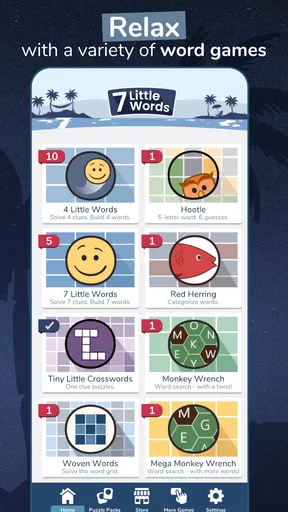
One of my favorite features is the variety. Not only do you have the classic mode, but there's also a "Packs" section where you can download themed puzzle sets. Whether you're into history, science, or just looking for a general brain workout, there's something for everyone.
Choosing a Session That Fits Your Day
For a realistic everyday use, I can imagine opening a daily puzzle while waiting for a takeaway order or sitting in a clinic lobby. I can work through a clue, put the phone down when my name is called, and return when there is another quiet moment. The game’s small-unit puzzle structure lends itself to that stop-and-start routine better than a long narrative game that expects sustained attention.
For a more deliberate session, I would pick a themed pack when I am in the mood to stay with a subject. The useful trade-off is that a theme can make the puzzles feel more coherent, while also narrowing the kind of vocabulary you encounter. If a topic is not one you know well, the challenge may come from the subject matter as much as from wordplay. Switching back to the general puzzles is a sensible way to reset rather than forcing a pack that is not clicking.
Perfect for On-the-Go Gaming
One of the standout aspects of this app is its flexibility. You can easily pick it up for a quick puzzle during your break or dive into multiple puzzles when you have more time. It's perfect for commuting, waiting in line, or just relaxing at home. Plus, the app doesn't require an internet connection, so you can play anywhere, anytime.
That offline convenience is particularly useful when a connection is unreliable, but I would still distinguish between playing puzzles already available on the device and downloading additional content. If I know I will be away from dependable service, I would prepare any pack I want to play beforehand instead of assuming every part of the app will be available offline. This small bit of planning prevents a quiet commute from turning into troubleshooting.
Compared with a conventional crossword app, this one reduces the need to manage a large grid and crossing answers; compared with a word-search game, it gives more weight to clue interpretation than to scanning letters. I would choose a crossword when I want a bigger, interconnected solving session, and a word search when I want something more visual and straightforward. This game sits between those options, with a compact but thoughtful deduction loop.
A Few Tips to Enhance Your Experience
To make the most out of 7 Little Words, I recommend tackling the daily puzzles. They not only keep your brain sharp but also help you build a streak. And trust me, once you start a streak, you won't want to break it. If you ever get stuck, remember, it's okay to use the "shuffle" button. It can give you a fresh perspective by rearranging the letters.
A practical way to use shuffle is to try it after you have considered a clue from more than one angle, not as the first response to uncertainty. The rearrangement can interrupt a visual pattern you have become fixated on, but it does not explain the clue for you. I also find it helpful to solve the answers I recognize first, then return to the uncertain ones with fewer distractions. That keeps one stubborn clue from holding up the whole set.
Another handy feature is the "hints" you can earn or purchase. Use them sparingly, though, as they can become addictive. Part of the fun is the challenge, after all!
Hints are best treated as a way to get past a genuine dead end, rather than as a routine shortcut. If I use one whenever I hesitate, I lose the satisfying process of testing synonyms and checking the letter pieces. On the other hand, if I have already tried a couple of interpretations and the puzzle has stopped being enjoyable, using help can be a reasonable way to move on. The right balance depends on whether I am playing for the solve or simply to relax.
What to Expect from Daily Play
The daily format is a good fit for someone who likes a small recurring mental ritual, but it can also turn a casual pastime into an obligation if streaks start to feel like a chore. I would use the streak as encouragement, not as a reason to open the game when I would rather be doing something else. Missing a day should not spoil the point of playing: enjoying a few clues when the timing suits you.
Because the challenge is language-based, the experience will naturally vary with vocabulary, familiarity with clue wording, and mood. A word that seems obvious to one player may not come readily to another. If I am tired, even a fair clue can feel unusually opaque, so I would rather leave it and come back later than conclude that the game has suddenly become too difficult.
The Community Aspect
The app also has a community vibe, with forums where you can discuss puzzles or strategies with fellow players. Sometimes, it's nice to know you're not the only one who found that last clue a bit tricky! This interaction adds a social layer to the game, making it feel more than just a solo endeavor.
That social element is most useful after I have made a genuine attempt and want to compare how someone else approached a clue. Looking at discussion too early can take away the pleasure of solving it myself, so I would save it for a puzzle that has become a dead end. Players who want direct head-to-head competition or a lively multiplayer match should look elsewhere; the appeal here is primarily personal deduction, with discussion as an extra rather than the main event.
Who Will Get the Most from It
I would recommend it to people who enjoy wordplay, like working through clues at their own pace, and want a phone game that can fit around ordinary interruptions. It can also suit families or friends who enjoy taking turns suggesting possible answers, since a clue often invites more than one line of thought before the tiles settle the question.
I would steer away from it if your ideal word game is timed, competitive, or built around a large crossword grid. It is also not the best choice when you want a game that relies on pictures, action, or a story to keep you engaged. The main pleasure comes from language and inference, so players who do not enjoy puzzling over phrasing may find the core loop repetitive even with themed packs and daily challenges.
Final Thoughts
In the vast ocean of mobile games, 7 Little Words and More stands out as a gem for word enthusiasts. Its simple yet challenging format makes it a delightful way to exercise your brain without feeling like a chore. Whether you're a casual player or a hardcore puzzle solver, this app has something to offer.
So next time you're itching for a mental workout, give 7 Little Words a try. It's more than just a game—it's a daily habit that will keep your mind fresh and sharp. Happy puzzling!
My verdict is that this is a well-focused option rather than an all-purpose word-game collection. Its clue-and-tile mechanic gives familiar vocabulary puzzles a distinct feel, while daily play and themed packs offer different ways to settle in. The limitations are just as clear: it is mostly a solo, unhurried experience, and its optional purchases may not appeal to players who want every extra included without spending.
With a release date of August 9, 2011, the game has had a long time to find its audience, and it currently sits at version 8.12.1. I would start with the free play, see whether the clue style suits you, and only consider purchases if you know you will use them. If you enjoy turning a few scattered letter groups into the answer to a good clue, it is an easy recommendation; if you want speed, competition, or a sprawling grid, another kind of word game will probably fit better.
Pros
- Unique word puzzle mechanics.
- Challenging yet rewarding levels.
- Daily puzzles keep content fresh.
- Offline play available.
- Simple
- intuitive interface.
Cons
- Limited hints without purchase.
- Ads can be intrusive.
- Some puzzles feel repetitive.
- No multiplayer mode.
- High difficulty spikes at times.
FAQs for 7 Little Words and More
What is 7 Little Words and More?
7 Little Words and More is a word puzzle game that challenges players to solve clues using a series of letter tiles. Each puzzle consists of seven clues and a set of tiles with two to three letters each. Players must match the clues to the correct word combinations, providing a fun and engaging brain exercise.
Is 7 Little Words and More free to play?
The game is free to download and play, offering a variety of puzzles without charge. However, there are in-app purchases available, such as additional puzzle packs or hints, which can enhance gameplay. Users can enjoy a substantial amount of content without spending money, but these extras can provide a richer experience.
What are the key features of 7 Little Words and More?
The game features a clean and user-friendly interface, making it easy for players of all ages to navigate. It offers thousands of puzzles across different difficulty levels, daily challenges, and themed puzzle packs. A hint system is also available to assist players when they get stuck, ensuring a rewarding experience.
Can I play 7 Little Words and More offline?
Yes, 7 Little Words and More can be played offline, making it a perfect choice for users who want to enjoy the game without an internet connection. This feature makes it ideal for travel or areas with limited connectivity, allowing continuous play without interruptions.
How does the hint system work in 7 Little Words and More?
The hint system in 7 Little Words and More provides players with assistance when they encounter difficult puzzles. Hints can reveal letters or complete words, helping players progress. These hints are limited but can be replenished through in-app purchases or by completing certain achievements within the game.


